I made a macOS app to kill the mouse
by Pablo Varela on Mon Apr 13 2026I’ve tried a few apps to use the mouse with the keyboard on macOS and none of them really worked for me.
Some were close, but paid. Some were open source, but too limited. Some had a nice idea, but I still found myself reaching for the mouse all the time.
So I made Mousetrap: a native macOS app that lets you move and click anywhere on screen with your keyboard.
How it works
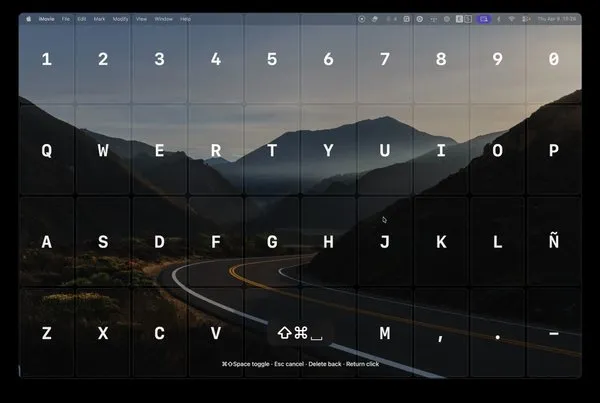
When you trigger Mousetrap, it shows a fullscreen grid that matches your real keyboard layout.

Then you press a key to narrow down the area. Then another. Then another.
There are 3 nested grids, so in a few keystrokes you’re already pointing at a very specific place on screen.
It also supports multi-key chords, which is probably my favorite feature.
You can press adjacent keys like zx or aszx to target the midpoint between cells, or a shared corner. This makes the final step feel much more precise.
And if you don’t want to use the grid, you can just move the cursor freely with the keyboard:
- arrow keys move the mouse
- Enter clicks
- Enter twice double-clicks
- Shift+Enter right-clicks
- Shift+arrow keys drag
Why I made it
Other apps I’ve used haven’t worked for me, but they definitely pushed me to create this one:
- Mouseless. Probably my favorite one, I was subscribed for a few months. The issues for me: it’s not free, not open source, and the config was quite complex. I did achieve a good enough workflow with it but I’ve never liked it as much as I like Mousetrap now.
- NoMouse. How on earth is it not possible to edit the default shortcut? Especially it being something so popular in code editors. Not to mention neither of the other settings can be customized. Still, I want to mention it’s a very nice app if you don’t care about those things.
- Shortcat. Lovely idea. I was really excited to use it, and I did for a while. But it did not match as many items on screen as I wanted and I found myself still using the mouse a ton.
- Superkey. Just like Shortcat, but paid and closed source.
Get it
You can install it with Homebrew:
brew install pablopunk/brew/mousetrapOr grab the latest release from the GitHub releases page.
Source code and more info: